PC Optimization Hub: a collection of various resources devoted to performance and input lag optimization
- Visual demonstration of 1 vs. 10 milliseconds
- "The average difference in aiming task completion (the time it takes to acquire and shoot a target) between a 12ms and 20ms PCs was measured to be 182ms - that is about 22 times the system latency difference."
- "In all studies, the trend shows continued improvements all the way toward zero latency."
- "We can confidently say that as little as 3 ms impacts gaming performance for above-average gamers."
- "240Hz is not enough. Not even close."
- "While participants performed dragging and scribbling tasks, very low levels of latency could be discriminated, i.e., ~1 versus 2 milliseconds while dragging".
- "In the first part, perceptual user experience under different jitter levels was examined using the ISO 4120:2004 triangle test protocol, and a jitter of over 0.3 ms could be perceived by sensitive subjects."
- "What Frame Rate is Needed to Simulate Reality?"
- "The human eye can see 39,620 Hz"
- Due to the sheer complexity of hardware and software and differences between various architectures, your mileage may vary. However, it is useful to be aware of things that can impact user experience and adjust them according to your needs.
- Create a personal document and keep track of everything you do. Adopt a systematic approach with proper testing methodologies, instead of just blindly changing many settings at once. Some settings are trade-offs between latency and frame time consistency / graphics quality. Some settings may not show a visible impact at first due to other bottlenecks.
- FrameView and PresentMon can measure both frame times and PC Latency. You can upload the CSVs here to visualize the frame time data, or here to visualize the PC Latency data. FrameView's PC Latency metric is only available in supported games.

- Do not daisy-chain power cables. Be careful not to short the loose ends if you have any.
- Mount your AIO cooler properly.
- Keep your PC clean. Clogged heat sinks and dust filters will reduce airflow and consequently heat dissipation. Furthermore, "dust may cause electrical leakage, shorting and opening of PCBs under different conditions".
- Check the USB layout of your system with USB Device Tree Viewer. Avoid ports that are connected to nested hubs. Ryzen CPUs have a dedicated USB controller. Check your motherboard's manual or HWiNFO to find out which ports are routed directly to the CPU.
- If your motherboard has multiple USB controllers, offload your other devices to them. Lower the polling rate of low-priority devices to an acceptable level, if possible (1).
- Cable type and ports can potentially produce different results (1 2) (don't Plug & Play these). Don't cheap out on cables. Both HDMI and DisplayPort have certification programs.
- Electromagnetic interference and issues with the electrical installation (e.g., ground loops) can cause unintended behavior of electronic components, potentially increasing input lag (1 2).
Here are some resources: 1 2 - "EMC tests were developed to make them easier to perform, provide better repeatability from one lab to another, and reduce testing costs. But even though the EUT may pass its EMC tests, it still may fail when it's put into service. Laboratory tests performed in accordance with the standards are not adequate to guarantee that an EMC failure will not occur during actual operation because the tests do not represent the operational EME."
Here are some examples: 1 2 3 4 5 6 7 8 9 10 11 12 13 - Make sure your home is properly grounded. TT systems are preferred due to low interference (1 2 3).
- Avoid unnecessarily long cables and prefer thick shielded ones.
- Disconnect everything you don't use from your motherboard to minimize the risk of coupling and interference. E.g., front USB, front audio, (RGB) LEDs (1 2), hard drive activity LED, system power LED, reset button etc.
- Move all devices that have electromagnetic fields away from your PC and peripherals. E.g., router, power strip/conditioner, voltage regulator etc.
"A typical PC can be upset with an electric field strength of 48 V/m, whereas an unshielded PC board requires about 9 V/m." - Make sure there is enough space between your cables (1 2 3 4 5) and untangle them. This applies to everything, including power and peripheral cables.


- Turn off (RGB) LEDs since USB current output is very limited (USB 2: 0.5 A, USB 3: 0.9 A). Moreover, "running an RGB effect/animation can take a great toll on the MCU. It requires a lot of processing power and will delay other processes." (1 2)
-
-
- The convenience of cordless mice is very appealing. However, there are significant drawbacks. Nowadays, 2.4 GHz is everywhere, causing a lot of interference. Additionally, the inherent transmission overhead and aggressive power saving mechanisms (1 2) affect both motion (1 2 3 4 5 6 7 8 9 10 11) and click latency.
-
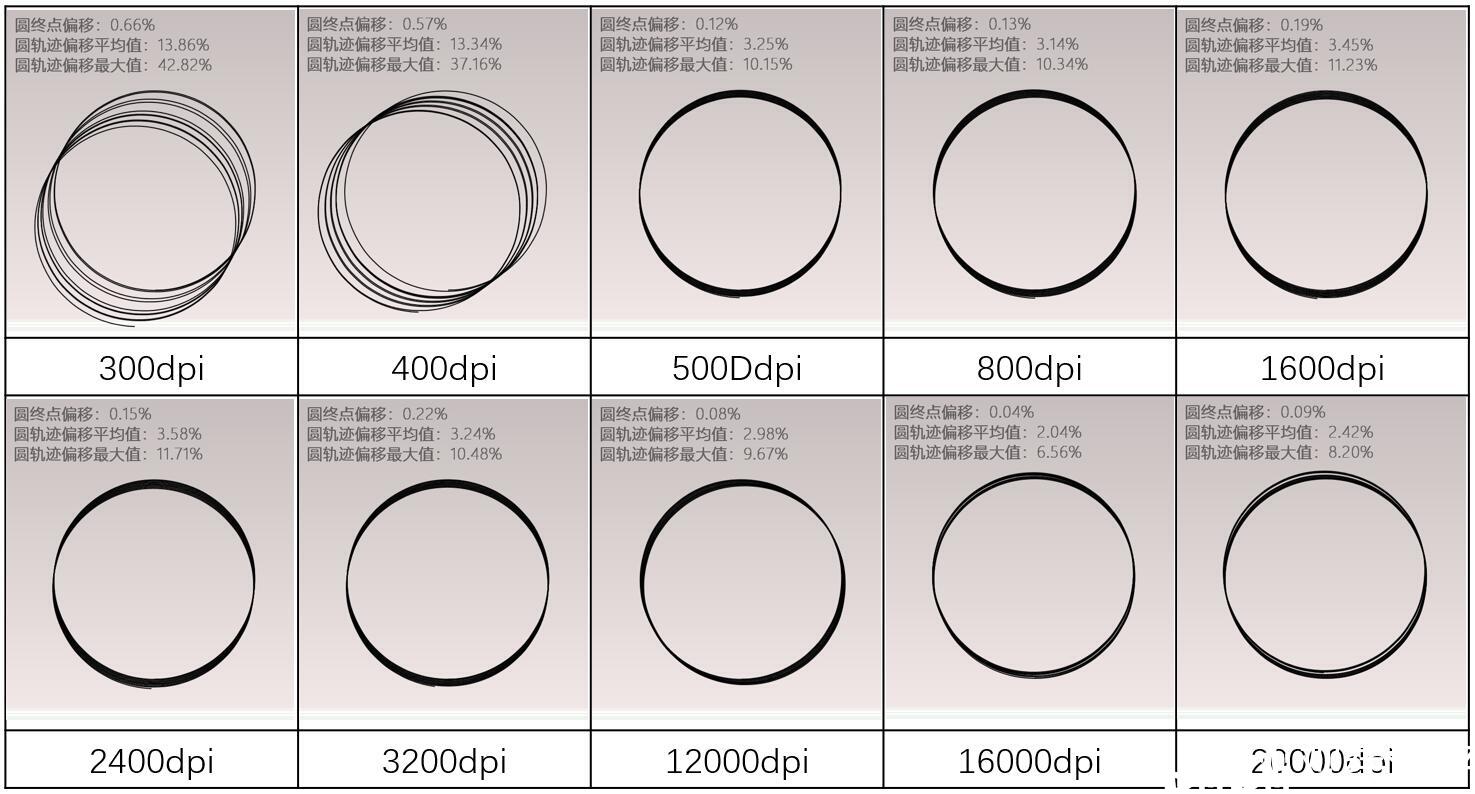
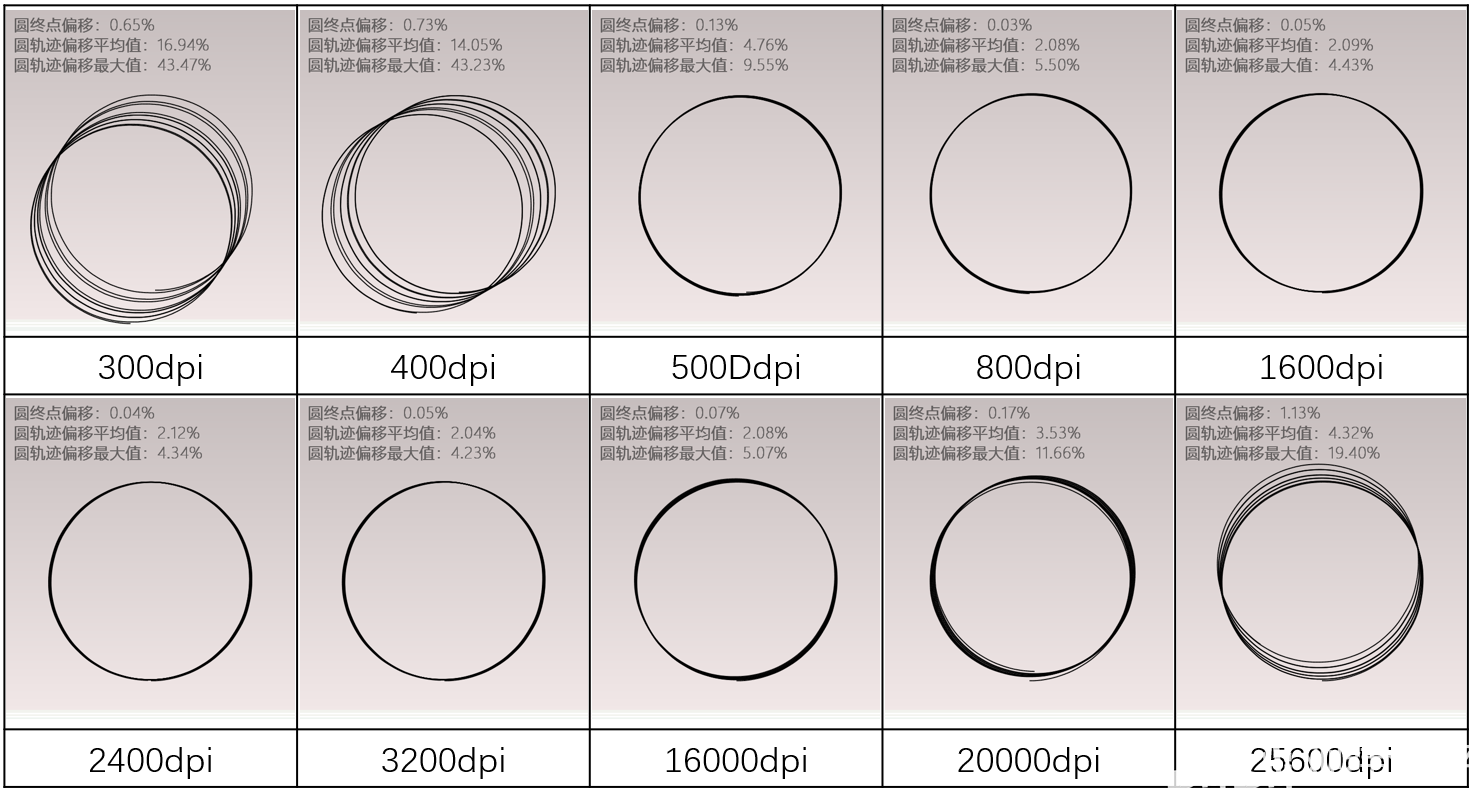
- Depending on your mouse, preferred cm/360°, mouse pad and FOV in games, you may want to experiment with different DPI. Higher DPI reduces the latency between hand motion and the sensor acknowledging a change (1 2 3 4) and improves motion clarity and accuracy (1 2 3 4). Beware of smoothing and other jitter reduction technologies kicking in at various thresholds. To counteract the increased sensitivity on the Desktop and in game menus, you can adjust the Windows sensitivity.
- Windows Sensitivity Calculator
- Finding your individual approximate point of diminishing returns (taking 1000 Hz as example):
- Run MouseTester and move your mouse unidirectionally at a velocity similar to your slowest realistic tracking speed.
- Set the graph to Interval vs. Time.
- Values greater than or equal to 2 ms indicate that the mouse hasn't reported motion data in the previous value - 1 poll(s) (assuming other factors such as system or interference have been ruled out).
- Raise your DPI until all polls contain motion data.
-
- Higher polling rate reduces latency and improves motion clarity (1 2).
- How to disable Interrupt Moderation
-
- A balloon pump will do the job without risking physical damage to the polycarbonate lens (1 2 3).
-
-
-
- There are a lot of variables involved: GPU workload, sustained frame rate, type of frame rate limiter (some limiters have large variation), OS, monitor's refresh rate, NVIDIA Reflex, AMD Anti-Lag 2 etc.
- Input lag increases as GPU workload increases.
- VRR and V-Sync increase input lag.
-
-
- This is called tearing.
- Visual demonstration
-
- This is called judder (1 2).
-
- Blur Busters' motion test with preconfigured settings (browser's hardware acceleration must be enabled)
- Test 1: Set the frame rate to half of your monitor's refresh rate.
- Test 2: Set the frame rate 5-10 FPS below half of your monitor's refresh rate.
- Test 3: Set the frame rate 5-10 FPS above half of your monitor's refresh rate.
- Tests 2 and 3 will stutter, while Test 1 will be smooth.
- Further information
- To prevent mistiming, you can either use VRR or cap your FPS at various values depending on your monitor's refresh rate. Consider your 1% and 0.1% Lows when choosing a value. There are two formulae (X = monitor's refresh rate, Y = any positive integer):
- X * Y
- X / Y if X %Y = 0
- FPS Cap Calculator
-
-




- Generally, follow the principle of "Don't use it? Disable it." E.g., disable all power saving features, unused network/audio/SATA controllers, unused USB/PCI/DIMM/SATA ports, (RGB) LEDs that can't physically be disconnected etc.
- UEFI Editor
- How to change hidden settings without flashing a modded BIOS
- I called this category clocking rather than overclocking because in the end all you do is run your components at their safe capabilities (which may not always be overclocking due to temperature, for example).
- A stable system should be able to run anything indefinitely. A single error is one too many.
- When raising clocks, always benchmark every change and verify that the performance scales positively and the variation is very low. Due to error correction, higher clocks may not cause errors in stress tests but can result in "identical" performance, worse performance or higher variation.
- Beware of degradation by high voltage, temperature and current.
- GPU and ambient temperature (e.g., summer vs. winter) will significantly impact memory temperature. Here are some things you can do while stress testing to simulate a more realistic scenario:
- Run a GPU heat generator.
- Mount a hair dryer to blow hot air on the memory.
- Turn off case fans.
- Turn up room heaters.
- Avoid monitoring programs (e.g., HWiNFO) while stress testing, since they have a large performance impact.
- CPU and RAM should be treated as one unit and adjusted and stress tested together.
- Resources: 1 2 3
-
- Impact on DDR5
- "Charge leakage rate of DRAM cells approximately doubles for every 10°C increase in the temperature".
- "The load has increased the main board temperature by 5 deg. (centigrade scale) only, but the influence to the measured performance counter frequency is quite considerable."
- "According to a report on reliability prediction of electronic equipment prepared by the U.S. Department of Defense, the failure factor, which is relative failure rate at any temperature over failure rate at 75 °C, increases exponentially with increasing the device temperature as demonstrated in Fig. 3. Pedram and Nazarian also reported that more than 50% of all integrated circuit (IC) failures are related to thermal issues. Thus a rule of thumb is that the failure rate of electronic components can be halved for each 10 °C reduction in their junction temperature and the cooler the devices operate, the more reliable they are."
- "The operating leakage current of an aluminium electrolytic capacitor with non-solid electrolyte is extremely dependent on the temperature and voltage."
- Conclusion: Maintaining near ambient temperature of components is desirable.
-
- Manually set voltages and clocks of all components.
- Use zip-ties to extend fans over VRMs, RAM and PCH. Avoid CPU air coolers due to incompatibility with dedicated VRM and RAM cooling.
- Liquid cool all components (expensive).
- The never-ending background bloat of Windows reduces performance significantly (1 2 3).
Note: I am not advocating using pre-made ISOs; on the contrary, you should make your own. - I highly recommend setting up a multi-boot environment to separate the gaming and the "can-be-bloated" operating system. Keeping your programs and files on a different partition (separate from operating system partitions) is also convenient due to all operating systems having shared access to everything and the ease of reinstalling either of them without having to back up your data.
- As usual, disable everything you don't explicitly need and avoid installing unnecessary and bloated drivers (included in, e.g., Realtek audio or gaming peripheral software).
- A lot of the default system tools lack functionality. For example, the Task Manager is an inaccurate representation of system load since it only displays core usage on a very superficial level. It doesn't account for things like context switching, which can be very expensive.
Here are some supplements for various system tools (Sysinternals and NirSoft have a lot more):- Task Manager: Process Explorer with modified settings
- Startup section of Task Manager: Autoruns
- Services: Serviwin
- Device Manager: DevManView
- NVIDIA Profile Inspector exposes a lot of settings that are hidden from the control panel.
- Whenever possible, use portable versions of programs. Sometimes installers come with background services/drivers which may run even if the program is not running. Scoop can help you manage them.
-
- NTLite
- Drivers (mostly relevant for W7) & driver integration guide
- Rufus / Ventoy
-
- Always check the legitimacy of ISOs by comparing hashes (1 2) to Heidoc's or Adguard's hash archive.
- Genuine Installation Media
- OS.click
- Adguard
- KichHoatBanQuyen's list
- Unknown list
- MSDN file server
-
-
- Blur Busters' utilities
- ApertureGrille's utilities
- Lagom monitor test
- EIZO monitor test
- Custom Resolution Utility
- ControlMyMonitor
- Open Source Response Time Tool
- piLagTester (input lag and response time tester)
- PPD Calculator: 1 2
- Video Timings Calculator
- Video Bandwidth Calculator
-
-
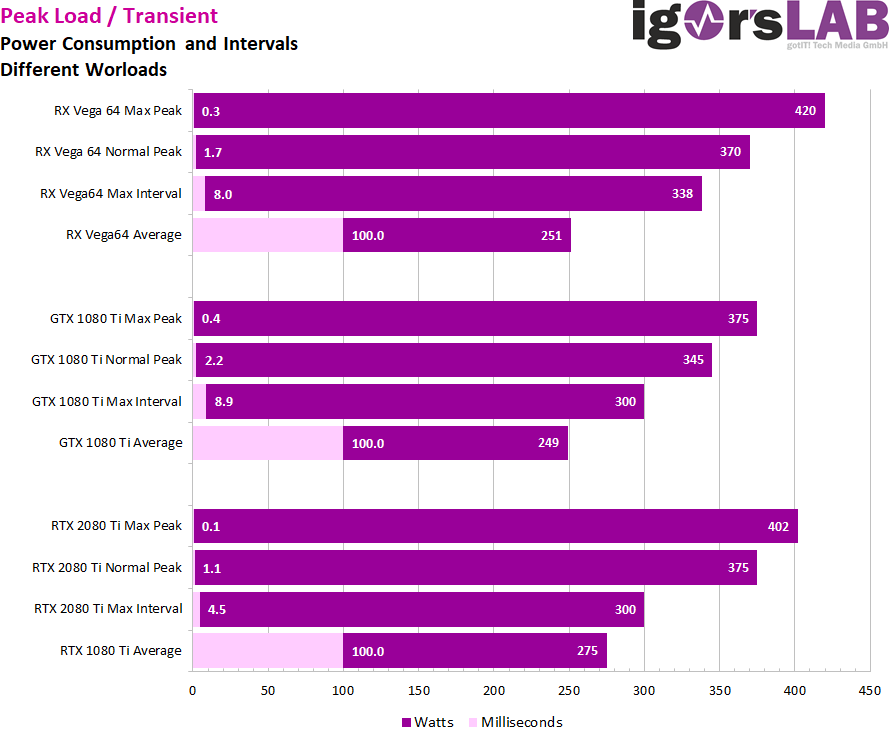
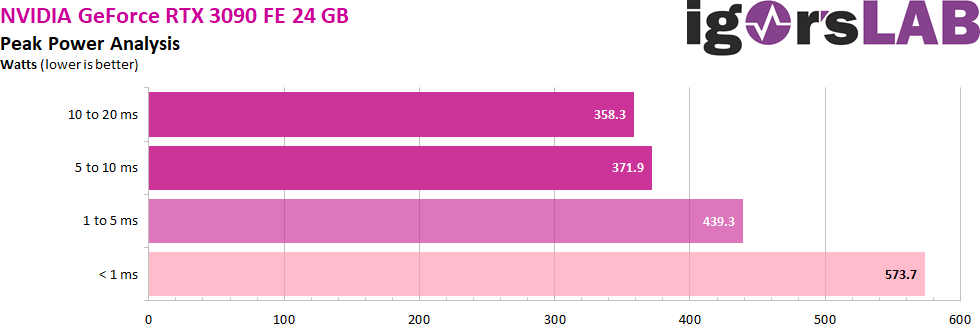
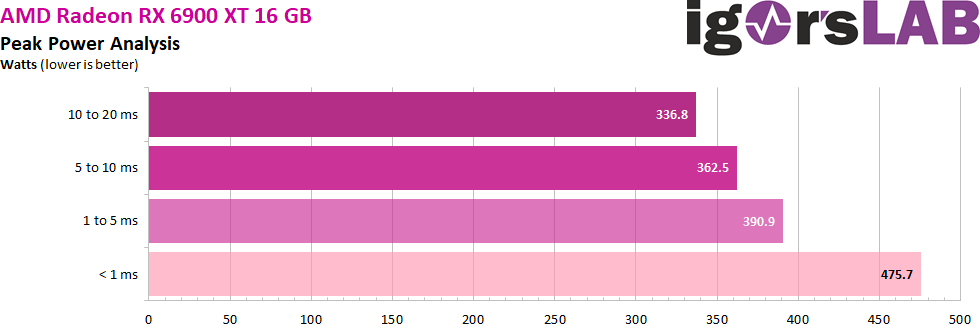
- When choosing a power supply, keep in mind that there are spikes that go well beyond the average power consumption (1 2 3 4 5).
- "Defining Power Supply Voltage Ripple & Its Real-World Impact"
- Single vs. Multi Rail
-
- LTT Labs
- Hardware Busters
- TechPowerUp
- Tom's Hardware
- Cybenetics (does not account for fire hazards)
-
-
-
- ZenTimings
- New versions of ASRock's Timing Configurator can usually be found on OCF download pages, e.g., Z890 Taichi OCF or Z590 OC Formula.
- Microbenchmarks
- Intel Memory Latency Checker
- AIDA
-
-
- WizTree / TreeSize / WinDirStat (disk usage analyzer)
- Ventoy (multi-boot USB drive)
- Rufus (ISO mounting)
-
-
- HWiNFO & LogViewer (hardware analysis, monitoring and reporting)
- Benchmarking FPS
- Windows Performance Toolkit (Windows 7)
- Process Monitor
- API Monitor
- Intel VTune Profiler
- Intel Graphics Performance Analyzers
- Processor Counter Monitor
- MouseTester
- XTW
- Latencymon
- Liblava
- PC Clock Timing (resolution of system time calls)
- Dependencies (dll load dependency checker)
-
- Scoop (package manager)
- Sysinternals (huge compendium)
- Nirsoft's Tools (huge compendium)
- NTLite (ISO creation)
- O&O ShutUp10++
- ViVe
- MultiTool
- ReservedCpuSets
- Process Lasso (priority and affinity saver)
- ProcessPluginFramework Service
- Quick CPU
- Power Plan Settings Explorer
- Timer Resolution
- VC++ Redist. AIO: TPU / abbodi1406
- MSI Utility (interrupt mode and priority control)
- Microsoft Interrupt Affinity Policy Tool
- GoInterruptPolicy
- USB Device Tree Viewer
- DeviceTree
- Special K (game modifying framework | DO NOT USE WITH ANTI-CHEATS)
- EasyBCD
- Winbindex (index of Windows binaries)
-
-
- LowAudioLatency / REAL (audio latency reduction)
- Round-trip audio latency tester
-
-
- Epic Games: Legendary
- Spotify: Foobar2000
- GHUB / LGS: Logitech Onboard Memory Manager
- Antivirus software: VirusTotal, Hybrid Analysis & uBlock Origin
- Chrome: Ungoogled Chromium
-
- Geizhals database (useful for finding specific hardware due to the very extensive filtering functionality)
- NVIDIA article on lag reduction
- Digitec return & RMA rates
- Mindfactory and Alza list per-product complaint rates.